How events move through stages
Who this is for: Recruiters and Service Providers who create or manage events. What you'll learn: The stages an event passes through, what happens to invitations and members at each stage, and how to progress or cancel an event.
Overview
Events on Cine Talent India — such as auditions, workshops, screenings, or promotional gatherings — follow a structured lifecycle. Like jobs, events must pass through a platform review before they go live to members. Understanding the stages helps you plan your event timeline and know what participants experience at each point.
The event stages
Draft
When you create an event, it starts in Draft. Only you and your team members (with the right permissions) can see it.
In this stage:
- You can edit all event details freely: title, description, date, location, capacity, and any linked jobs.
- Invitations have not been sent yet.
- Members cannot see or join the event.
When the event is ready, submit it for review.
Submitted for review
Once you submit, the event enters Submitted for Review. The platform team checks that the event meets community guidelines.
In this stage:
- You cannot edit the event while it is under review.
- Members cannot see the event.
- You will receive a notification when the review is complete.
If the platform needs changes, the event is returned to Draft with feedback. If approved, it moves to the Published stage.
Published
An approved and published event is live and visible to invited members.
In this stage:
- Invited members can view event details and respond to their invitations (accept or decline).
- You can manage attendance, send reminders, and link the event to relevant jobs.
- The event is visible to members who have been invited or who are members of the associated project.
Completed
When the event has taken place, mark it as Completed.
In this stage:
- The event record is preserved, including the member list and any linked jobs.
- No new invitations can be sent.
- Members can still view the event details for reference.
Completed events appear in the project's history.
Cancelled
If an event cannot go ahead, it can be Cancelled by the event owner.
In this stage:
- Invited members are notified that the event will not take place.
- No further actions (invitations, attendance updates) can be taken.
- The event record is preserved so you have a record that it was planned.
Stage diagram
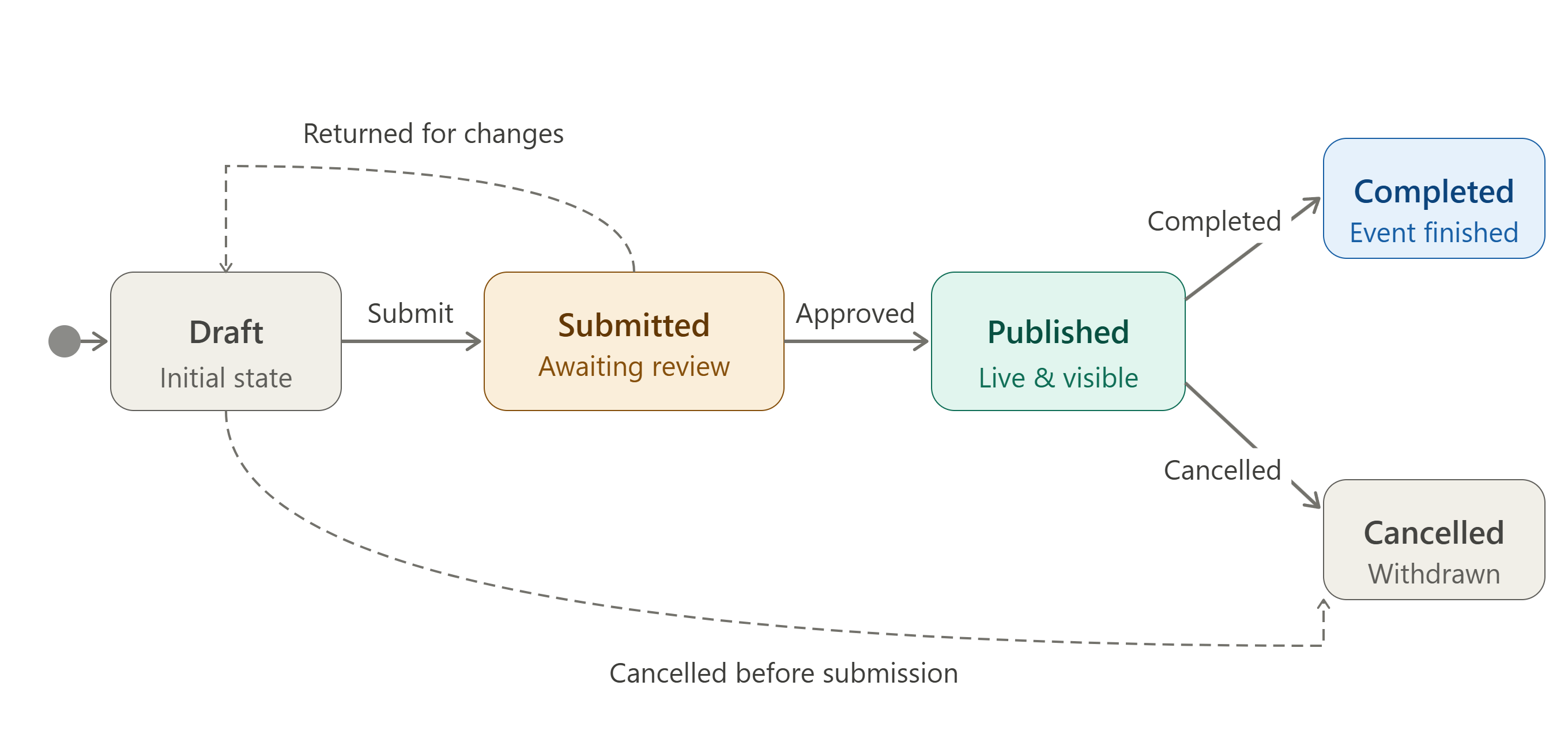
What happens to invitations and members at each stage
| Stage | Invitations | Members |
|---|---|---|
| Draft | Not sent | Not visible |
| Submitted for Review | Not sent | Not visible |
| Published | Can be sent and responded to | Can view and accept/decline |
| Completed | No new invites | Can view event record |
| Cancelled | Members notified | Can view cancelled record |
Common questions
How long does event review take? Review times are similar to job postings. You will be notified when the review is complete. Contact platform support if an event has been in review for an unusually long time.
Can I edit a published event? Some details can be updated after publishing (such as minor logistical changes), but major changes to dates, capacity, or linked jobs may require you to cancel and recreate the event. Check the event edit screen for which fields remain editable after publishing.
Can I cancel a published event? Yes. If an event must be cancelled after publishing, use the Cancel option on the event page. Invited members will be notified.
What is the difference between Completed and Cancelled? Completed means the event actually took place and is now in the past. Cancelled means the event did not happen and will not happen.
Can a Completed event be reopened? No. Completed and Cancelled are final stages. If you want to run a similar event again, create a new one.
Who can create events? Events are created within projects. The project owner and members with event-creation permissions can create events. The permission is granted by the project owner.
Related help
- Project stages explained
- How a job moves through stages
- Understanding your dashboard