How your profile moves through stages
Who this is for: All members — Aspirants, Recruiters, and Service Providers. What you'll learn: The stages your profile passes through, what triggers each change, and what you can do at each stage.
Overview
Your profile does not simply exist or not exist — it moves through a series of stages that reflect how complete it is, whether it is visible to others, and whether the platform or you have changed its status. Understanding these stages helps you know why you may or may not appear in search results, and what to do next.
The profile stages
Incomplete
When you first create your profile (after the wizard and payment), many of the detail fields are still empty. Your profile is in the Incomplete stage.
In this stage:
- You can log in and use the workspace.
- You can fill in your profile details at your own pace.
- Your profile is not visible to other members and does not appear in search results.
- Some features (such as applying to jobs as an Aspirant) may not be available until you complete your profile.
The profile page shows you which required fields are still missing so you know exactly what to fill in.
Complete but private
Once you have filled in all the required fields, your profile becomes complete. However, being complete does not automatically make you visible to others. After completion, your profile is in a private state — it exists and is fully set up, but other members cannot find you in search results.
In this stage:
- All required fields are filled.
- You can use all workspace features available to your profile type.
- You are still not visible in search results.
- You can choose when to "go public" — that is, make your profile searchable.
Searchable (public)
When you are ready to be discovered, you can make your profile searchable. This is what "going public" means on this platform. Once searchable, your profile appears in search results and other members can find and view it.
In this stage:
- Other members can find you by searching for profiles.
- Recruiters can discover Aspirants, and Aspirants can find recruiters and service providers.
- You remain in control — you can make your profile private again at any time.
To make your profile searchable: Go to your Profile page in the workspace and look for the visibility or privacy toggle. Switch it to make yourself discoverable.
To make your profile private again: Use the same toggle to switch back. Your profile disappears from search results, but your account and all your data remain intact.
Suspended
A profile can be placed in a suspended state by the platform, typically because of a reported issue, a policy review, or a moderation action. You will receive a notification explaining the reason.
In this stage:
- Your profile is not visible to others.
- Access to certain features may be restricted.
- You can contact the platform support team if you believe the suspension was made in error.
This stage is managed by the platform, not by you.
Deactivated
You can choose to deactivate your profile if you want to step back from the platform for a while without deleting your account. Deactivation is voluntary and reversible.
In this stage:
- Your profile is removed from search results and is not visible to others.
- Your data and settings are preserved.
- You can reactivate your profile later.
Stage diagram
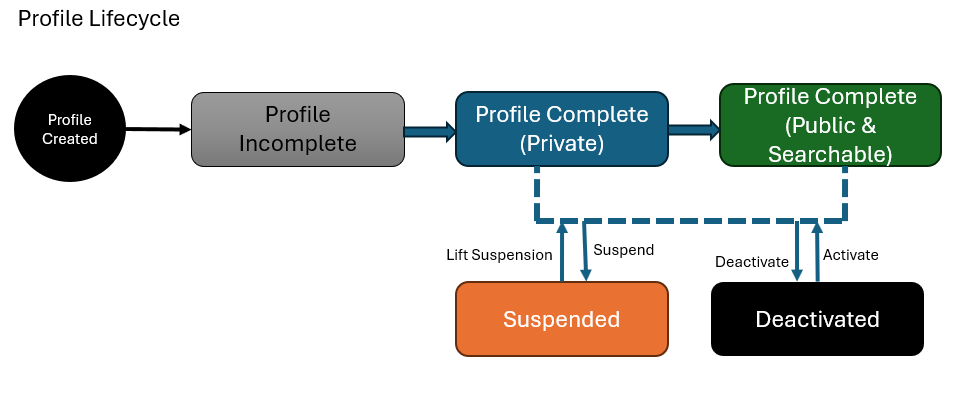
What affects whether you appear in search results
You appear in search results only when your profile is in the Searchable stage. The following will prevent you from appearing:
- Your profile is still Incomplete (missing required fields).
- Your profile is Complete but private (you have not switched on discoverability).
- Your profile has been Suspended by the platform.
- Your profile has been Deactivated by you.
- Your subscription has lapsed — some plans restrict search visibility when the subscription is inactive.
Common questions
How do I know what fields I still need to fill in? Your profile page displays a clear list of incomplete or missing fields. Follow that list to complete your profile.
Will going public immediately show me to everyone? Yes — once you switch your profile to Searchable, it becomes discoverable in search results right away. There is no waiting period.
Can I be in search results on one profile but private on another? Yes. Each profile has its own visibility setting. You can have your Aspirant profile set to Searchable while your Recruiter profile stays private, or vice versa.
What is the difference between Suspended and Deactivated? Suspended is a platform action — it is done to your profile by the platform team, usually following a policy review. Deactivated is your own choice — you turn it off voluntarily. Both remove you from search results, but only Deactivated is something you control.
If I make my profile private, do I lose my data or subscription? No. Making your profile private only affects your visibility in search. All your data, files, project memberships, and subscription remain exactly as they were.
Related help
- Creating your first profile
- Your subscription and what it unlocks
- Account and profile settings